

Introduction
It’s 5:45 PM in the Silicon Valley of India, the clock is ticking with the same ruthlessness that Cinderella experienced during the royal ball. If not booked within the next five minutes, you are damned in this cubicle for eternity (read 7 o’clock IST) because you won’t be able to call a ride, thanks to evening showers and surge pricing on ride-hailing apps.
Imagine a poor soul trying to uproot their already receding hairline just because someone asked to change the background, for the nth time today. Clearly, you are in the marketing team’s space, yelling at or frantically requesting your graphic designer. If yes, this post is for you.
Also, please note that whatever I talk about in the next few paragraphs is not my inner demon cursing but has been referenced from the holy book of design: The Design of Everyday Things by Don Norman.

Art vs. Design: Same canvas, different jobs
An artwork is a projection of the artist’s inner world. It is expressive, subjective, and its success is measured in goosebumps.
A design is meant to inform and support a decision or aid an activity. It is objective-driven and user-centred, with success measured by time-to-comprehension, error rate, and conversion.
Think of it this way: art woos, design works. Art wants to be noticed. Design wants to disappear the second it has done its job. As Don Norman reminds us, “good design… is invisible,” serving needs without demanding attention. (The Design of Everyday Things, DOET)

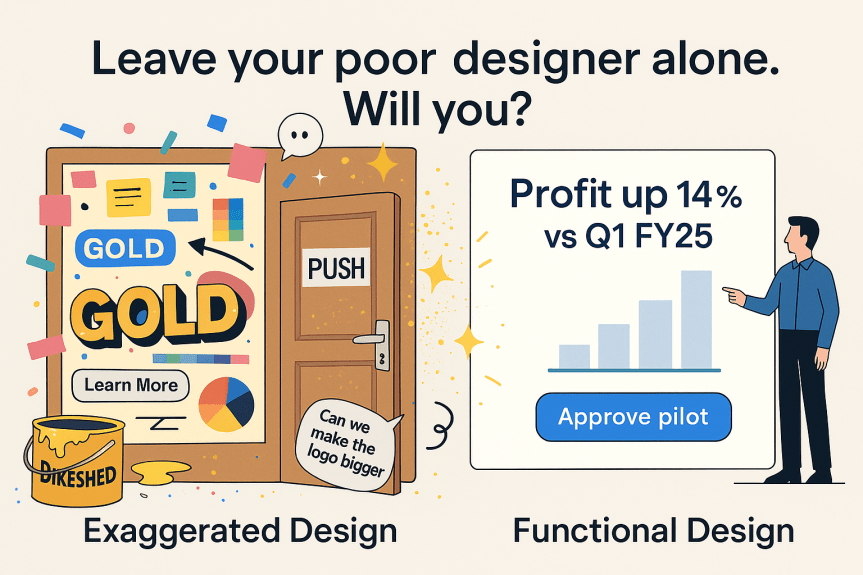
Two species of design: functional vs. out-of-the-world (just looking like a wow!)
Pushpa! I hate heavy jargons. Well, the following are very important for you to understand the human psychology behind interpreting designs. Here are easy explanations for them and how they help in reading a design:

1) Cognitive Load Management: Make brains work less, understand faster
Your brain is like phone RAM. It can comfortably juggle only 3–4 things at a time. If a slide/website/email throws 9 things at once, the brain stalls, guesses, or quits. Good design shrinks what must be juggled so people grasp the point quickly and act.
Three kinds of load (translated)
- Task load (intrinsic): How hard the thing naturally is.
Tactic: break big ideas into steps; one idea per slide. - Noise load (extraneous): Distractions from messy layout, fancy fonts, rainbow colors, jargon.
Tactic: remove anything that doesn’t change a decision. - Helpful load (germane): Patterns and cues that make learning easier.
Tactic: clear headings, consistent layouts, examples, labels.
How to lower the load (fast rules)
- One outcome per slide/page. Headline states the conclusion, not a topic.
- Show, don’t make me hunt. Big number + what it means + time frame (e.g., “↑14% vs Q1 FY25”).
- Three bullets max. Start each with a verb.
- Hierarchy the eye can feel. Use size/contrast/spacing so eyes land → read → act.
- Group related items. Things that belong together sit together (box or spacing).
- Limit choices. Fewer buttons/options = faster decisions (hello, Hick’s Law).
- Use the brand, not glitter. Approved fonts/colors, strong contrast; reserve accent color for the one thing that matters.
- Put knowledge on the screen. Labels, legends, axes, and cues right where needed—don’t make people remember from earlier slides.
Quick tests (30 seconds total)
- 3-second squint: Can I tell the point?
- 10-second scan: Can I see the action to take?
- 30-second newbie: Would a new stakeholder get it without narration?

2) Pre-attentive attributes (size, colour, position): Make key information pop instantly
Pre-attentive attributes = visual cues your brain notices in ~200 ms before you consciously “read.” Use them to steer eyes to the signal, not the scenery.
What counts as pre-attentive?
- Color
- Size
- Position
- Length/Width/Angle/Slope
- Orientation
- Shape/Icon
- Enclosure
- Proximity
- Texture/Pattern
- Motion
Common traps (avoid)
- Rainbow everything: too many hues = no hierarchy.
- Highlighting five things: if everything shouts, nothing speaks.
- Pie charts for precision: angles are weak; use bars.
- Icon salad: shape overload slows scanning.
- Decorative motion: draws attention off the message.
20-second QA
- Squint test (3s): Does the right thing pop?
- Scan test (10s): Can I tell “what happened” and “what to do”?
- Colour test (7s): Remove colour—does the layout still guide me?
3) Information Scent: Clear cues that promise relevant content
Information scent = the tiny clues (words, labels, visuals) that tell people, “If I click here, I’ll get exactly what I need.” Strong scent builds click confidence; weak scent causes hesitation, backtracking, and drop-offs.
Why it matters (in plain English)
- Faster decisions: People pick the right path sooner.
- Lower bounce: Fewer “Whoops, not this” moments.
- Higher conversion: The promise matches the payoff.
Where scent lives
- Headlines & subheads: front-loaded with the user’s goal.
- Links & CTAs: specific verbs + outcome (not “Learn more”).
- Navigation labels: user language, not org chart jargon.
- Cards/thumbnails: image + microcopy that previews content.
- Search results/metadata: title + description that mirror the page.
- On slides: section titles, callouts, and a single, obvious next step.
How to strengthen it (fast rules)
- Name the job, not the topic.
Bad: “Solutions” → Good: “Media Plans for Indian SMEs” - Front-load keywords users scan for.
“CTV Pricing: Metro vs Non-Metro (2025)” - Make the promise specific—and keep it.
CTA: “Download 3 Sample CTV Plans (XLS)” → lands on an XLS, not a contact form. - Use consistent patterns. Same verb format for all CTAs; same card layout across a grid.
- Show the payoff in-line.
Add size, format, time, or outcome: “Case Study · 3 min read · FMCG”
- Avoid clever-but-vague labels.
“Get Started” → “Get Rate Card”
“Learn More” → “See Targeting Options”
Common scent killers (avoid)
- Vague labels: “Solutions,” “Resources,” “Learn More.”
- Clickbait: promise big, deliver forms.
- Brand-first jargon: internal names nobody searches for.
- Rainbow buttons: too many CTAs = no priority.
- Decorative images with zero preview value.

Yeah, so coming back to the topic at hand
Functional design optimises clarity and outcome: it reduces cognitive load and increases signal-to-noise for faster decisions.
Showpiece design optimises recall: distinctiveness and mnemonic hooks for top-of-funnel fame.
- Functional = decision-support artefact that speeds comprehension and lowers error rates.
- Showpiece = mental-availability amplifier that “sticks” a short idea or brand name.
And beware “featuritis” — the compulsion to bolt on options “beyond all reason.” (Norman calls this “creeping featurism.” — DOET)
“Many products defy understanding simply because they have too many functions and controls… [like] Hollywood’s idea of a spaceship control room.” — DOET

B2C vs. B2B: who is using this thing?
Yes, we all love Ramesh and Suresh ads, Fevicol ka majboot jod ads — basically every ad that tickles us and makes us guffaw. And hats off to the creative minds behind these commercials, but before we say it out loud – “mazaa nahi aa raha”, take a step back and ask yourself:
Who is it for? What do I want it to do?
In B2C categories with thin differentiation and low price sensitivity, design often triggers impulse (think checkout-lane chocolate).
In B2B, multiple personas touch your material: users, buyers, finance, and compliance. Your job is to reduce friction across a committee. No one approves a PO because the PPT sparkled; they approve when risk feels low and value feels obvious.
“It is the duty of machines… to understand people.” – DOET
(So design for people, not for the console.)
Human Centred Design in practice: solve the right problem
Human-Centred Design puts “human needs, capabilities, and behaviour first.” – DOET
Start by validating the problem, not just the feature list. As the evergreen product truth goes:
“People don’t want a quarter-inch drill; they want a quarter-inch hole.” – Theodore Levitt
Iterate ruthlessly: observe, ideate, prototype, test, refine. Jakob Nielsen’s rule of thumb? Testing with five users often surfaces most major issues.

Make it readable by design (not by luck)
- Zero defects in language
Typos erode trust. Keep sentences short, verbs strong, voice active. - Brand guardrails > brand cosplay
Use approved palettes, type, and logo lockups; keep contrast legible (aim at least WCAG AA). Reserve the brand accent for the one thing that matters. - Colour with a job
Colour signals hierarchy and state, not decoration. Avoid red-green for critical statuses. One accent = one beacon. - A layout that reads itself
People scan in F- or Z-patterns; place headline, proof, action in that flow. Group related items (Gestalt: proximity, similarity). Norman’s mapping principle applies here: when layout mirrors logic, users “easily determine how to use” it. – DOET - Reduce cognitive load
Hick’s Law: more choices, slower decisions. Show the 20% that explains 80%; park the rest in the appendix. - Numbers with context
Always pair metrics with baseline, delta, and time frame. Use the simplest correct visualization. - One next step
End each slide with a single, verb-led CTA.
A pocket checklist for approvers
- Message clear in 3 seconds?
- New stakeholder gets it in 30 seconds, unaided?
- Exactly one action, labelled as a verb?
- Brand guardrails followed?
- Anything that doesn’t change a decision removed?
If yes to all five, debating “slightly different gold” is b**ls**t.
Ohh no! I am a habitual naysayer. How do I justify my role here?
Your job is not to get impressed but to step into the shoes of someone who is juggling thousands of tasks together and has very kindly spared 2–3 seconds to see your campaign/design.
Just keep in mind,
- Design is not a talent show. It is an operations function for communication.
- Opinions are welcome, objectives are required. If feedback is not tied to a user goal, an outcome, or a metric, it is a preference. Preferences are optional.
- Deadlines beat decorations. Every embellishment costs man-hours and introduces the risk of producing a cluttered design.

The unglamorous truth about marketing
I would like to confess something. Almost a decade ago, I was preparing a deck for a case study challenge. I do not remember the problem statement clearly, but I do remember my first suggestion: Change the brand logo. It’s boring. Even now, I am embarrassed by this particular memory.
However, after spending years in this role, I have realised one thing: from the outside, marketing looks like “How can we do it differently?” From the inside, effective marketing is “How can we understand the audience so well that our message feels native, obvious, and true?” The highest compliment is invisibility. When your buyer thinks “Of course” instead of “Wow,” you win.
Authenticity is not a filter; it is what remains when you stop trying to impress and start trying to help. As Norman puts it, “good design… is invisible.” – DOET
If your work reads as obvious, you did it right.
And if you’ve followed my article and understood the assignment, then maybe, just maybe, at the next office party, your designer will clink their glass with yours and say it loud: “Cheers!”

 The BIOSCOPED Life